
Integrating a Minimal Commandable Unit
This guide builds a verifiable AI-unit loop: a guard Pawn normally runs its own AI, enters a Command StateTree after receiving a move command, accepts two appended waypoints, executes an inserted emergency dodge, and finally cancels the command and resumes its previous behavior. The scenario validates the Pawn-only component constraint, execution routing, FIFO queuing, and interruption boundaries.
Related documentation: first read Command System, see Command Definition and Dispatch Parameters for fields, and read Command Extension Points when a custom backend is required.
Prerequisites
Prepare a Pawn or Character controlled by an AAIController, and confirm that it is not player-controlled. The default StateTree execution layer rejects player-controlled Pawns, Pawns without an AIController, and Controllers without StateTreeStack.
- GenericAISystem and the StateTree / GameplayStateTree dependencies are enabled.
- The Pawn's Controller has
UGAIS_StateTreeStackComponentand a usable Command layer. - The project Blackboard retains the default command Keys, or
UGAIS_DeveloperSettingsand the StateTree readers have been updated together. - Command-dispatch logic runs on the server; when initiated by a client that owns the Pawn, use the corresponding
Server...RPC.
UGAIS_CommandSystemComponent must be added to the Pawn itself, not to the AIController, a regular Actor, or a building Actor. If the current test object is a regular Actor, convert it to a Pawn/Character before continuing. Merely adding the component to an Actor in Blueprint is not a supported configuration.
1. Add Components to the AI Pawn
Add Command System Component (UGAIS_CommandSystemComponent) to the guard Pawn Blueprint. Do not add it to the Controller Blueprint. If the unit will later participate in squads or Tactical Assignment, also add UGAIS_UnitComponent; this tutorial does not depend on it.
Run PIE and obtain the Pawn's Get CommandSystemComponent on the server. Initially, IsIdle should be true, GetCurrentCommandData should be empty, and the queue should be empty. This immediately reveals a component attached to the wrong object or an initialization failure.
2. Create a Minimal Move Command
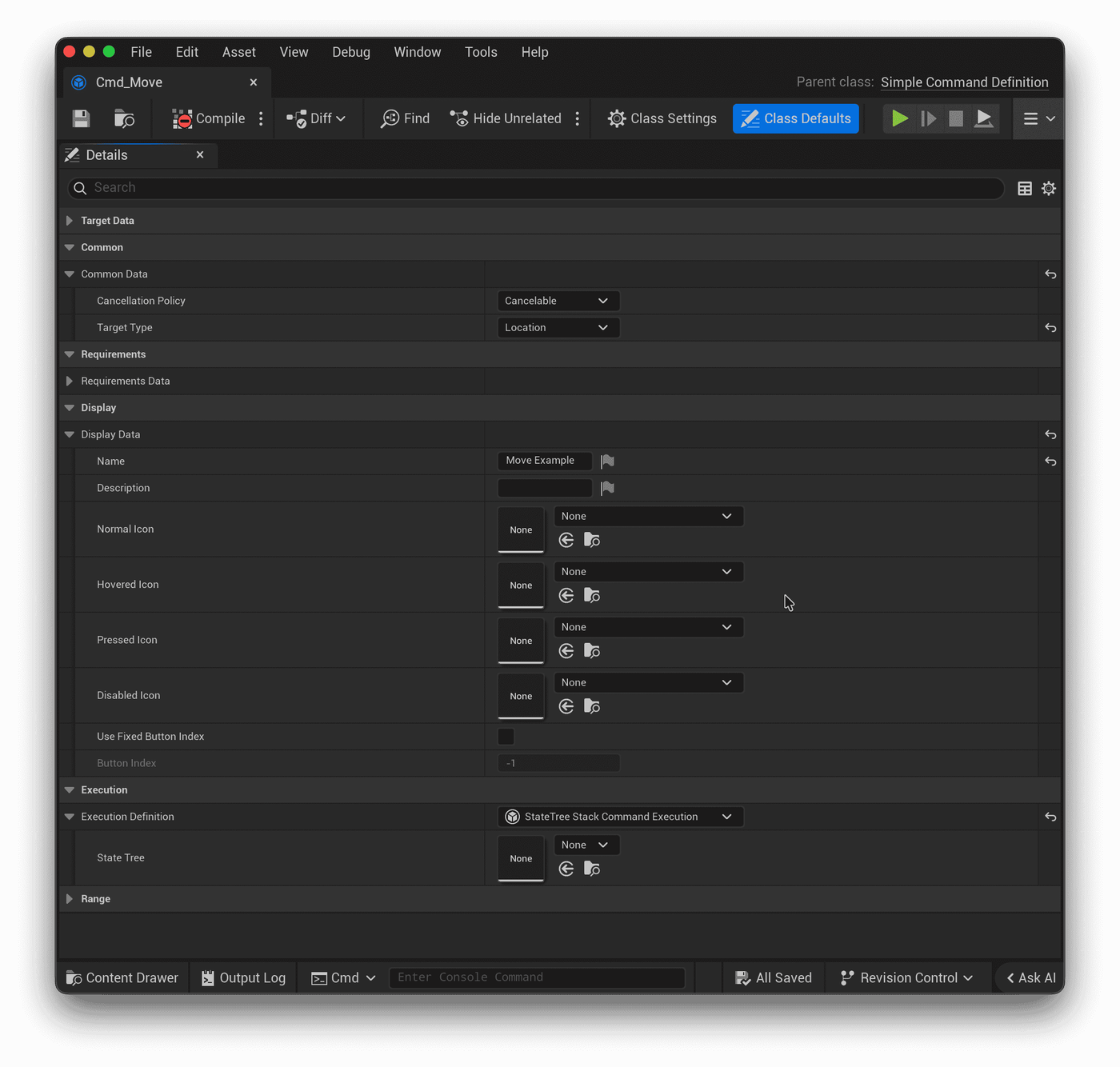
Create a Blueprint derived from Simple Command Definition and name it Cmd_Move. Simple is appropriate when one asset represents one stable command. Movement, interaction, healing, and ordinary attacks usually start here.
Configure the asset as follows:
Group | Suggested configuration | Purpose |
|---|---|---|
Common | Set | Allows location requests and lets a new move or dodge interrupt the current one. |
Display | Provide a name, icon, and optional button slot. | Used by HUD or command UI; does not affect execution validity. |
Range | Keep defaults for the first pass or set a movement-completion distance. | Supplies distance semantics to StateTree. |
Execution | Add inline | Uses the default StateTree backend. |
Select a StateTree asset in the Execution StateTree field. The field is a full FStateTreeReference, so normal StateTree parameters can be configured on it.
3. Build a Minimal Move StateTree
Create a StateTree using StateTreeAIComponentSchema and name it ST_Cmd_Move.
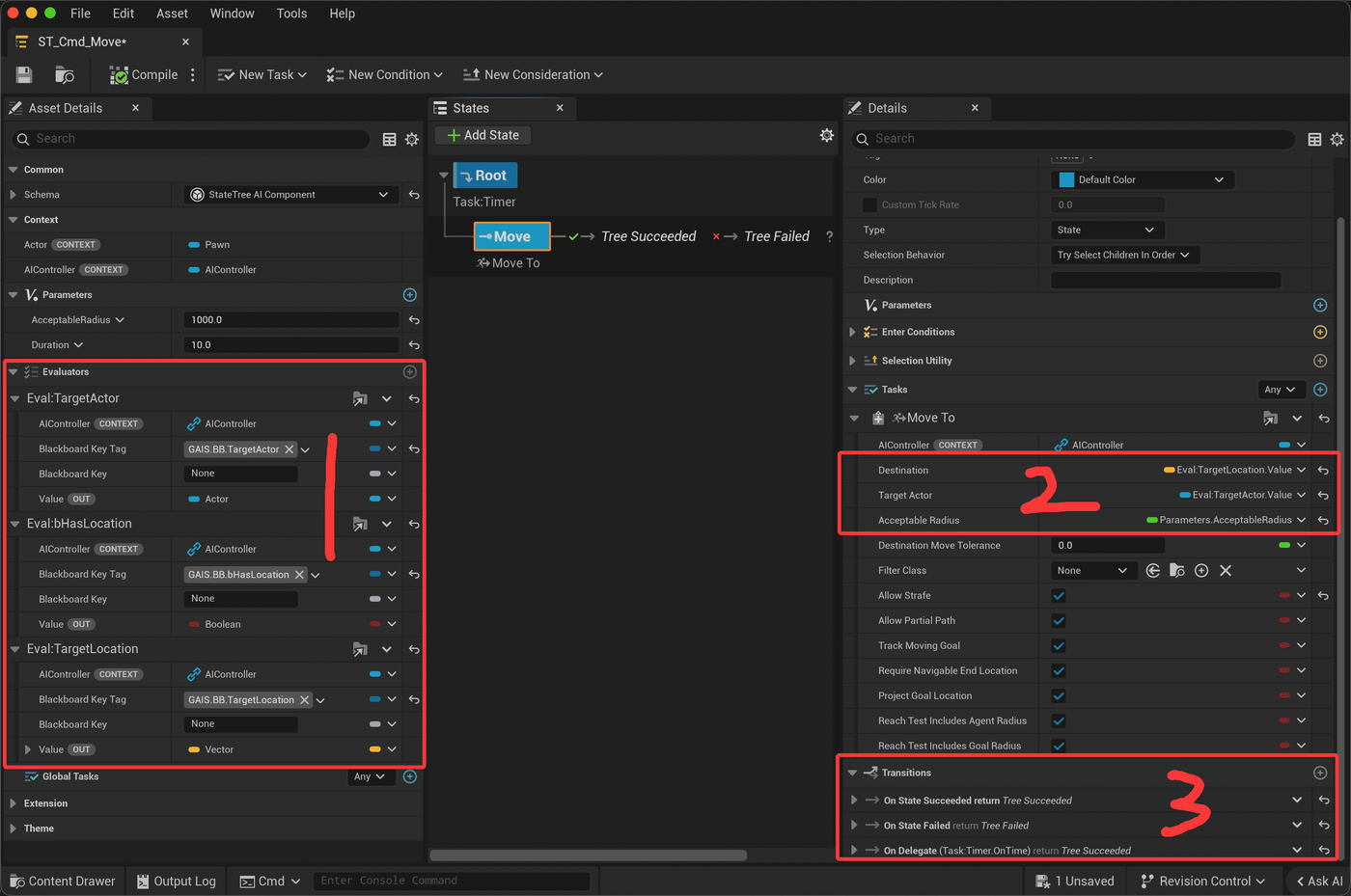
This StateTree does not decide whether the unit should move. It executes the current command that CommandSystem has already validated:
- Obtain the Pawn and Controller from StateTree context.
- Use the provided BB (Blackboard) Evaluators to read the target location and other data written while the command is accepted.
- Add
Task: Timeron the Root and use its Duration as the command timeout. - Feed command target data and movement parameters into the native MoveTo Task.
- Report success when MoveTo reaches the destination; report failure when the target is unreachable, blocked, or another condition fails.
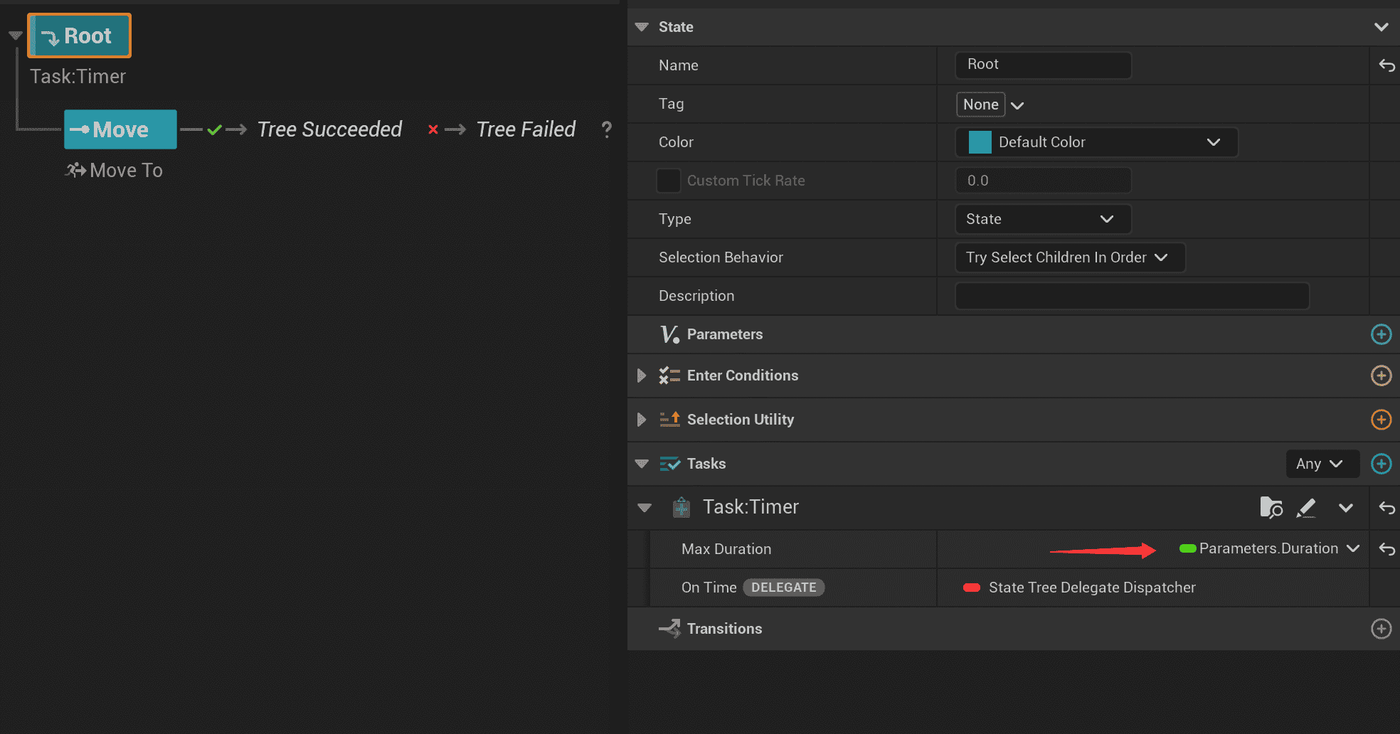
- A Timer timeout may also trigger a Transition that reports success.
Example flow:
1Read current Location command2→ Request movement to location3→ Reached: complete Succeeded4→ Navigation failure / invalid target: complete Failed
When the Command layer ends, StateTreeStack removes the route belonging to this command, allowing the guard's lower-priority patrol StateTree to continue. Do not leave the Command StateTree running forever, or the queue will never advance.
4. Construct and Issue the First Command
In server Blueprint or authoritative C++ logic, create a Location-form FGAIS_CommandData: Definition points to Cmd_Move, bHasLocation is true, Location is the clicked point, and a Simple command normally keeps Index = -1. Pass it to the Pawn's IssueCommand.
1Select guard Pawn2→ Get CommandSystemComponent3→ Make Location Command Data (Move, target location, Index=-1)4→ Issue Command5→ Verify return value is Started
Expected result: CurrentCommand becomes Move, StateTreeStack enters the Command layer, and the guard begins moving. If the result is Rejected, first confirm that TargetType and payload are both Location, that Execution has a valid StateTree, and then check the Pawn Controller/Stack requirements.
5. Verify Queuing and Insertion
Create two requests using the same move command but different positions.
- While the guard is moving, call
EnqueueCommandfor positions B and C. Both should returnQueued, andGetCommandQueueshould list B then C. - Create a location request for a medical point and call
InsertCommandAfterCurrentCommand. It does not interrupt the current move but should appear before B. - Create a request to dodge to a safe point and call
InsertCommandBeforeCurrentCommand. Because Move isCancelable, the current move is canceled and dodge begins immediately. Only after dodge ends with a success-class result can the interrupted move be resumed.
This matches common real-time tactical interactions: Shift appends patrol points, a temporary pickup or heal becomes the next action, and an explosion warning inserts an urgent dodge. Do not implement every high-priority request with IssueCommand; it replaces the current command and clears the existing queue, which is appropriate only when the new intent completely supersedes the old one.
6. Verify Cancellation and Results
Call CancelCommand while moving. It returns true only when the current command is Cancelable. The Command StateTree then receives cancellation, CurrentCommand clears, the latest result reports Canceled with its reason, and the lower guard AI resumes.
Observe these stable interfaces rather than inferring results from private execution state:
Observation point | Expected result |
|---|---|
| Current command enters, is replaced, or clears. |
| Order after queuing, insertion, or clearing. |
| Latest success, failure, or cancellation and its reason tag. |
GameplayDebugger CommandSystem panel | Current, Queue, Last, LastResult, and ReasonTag. |
ClearCommandQueue discards only waiting entries, which is useful when canceling Shift waypoints while keeping the current movement. ClearCommands also attempts to cancel the current command and is therefore blocked by NonCancelable.
MultiVariant: One Entry Point, Multiple AI Behaviors
When one Attack button must select melee, ranged, or healing behavior, create a Multi Variant Command Definition rather than three nearly identical Simple assets. Configure DebugName, TargetType, Requirements, Display, Range, and ExecutionDefinition for each item in Variants; FGAIS_CommandData.Index selects the array position at runtime.
For example, Index 0 can use a melee Command StateTree, Index 1 a ranged StateTree, and Index 2 a casting StateTree. They may use different ranges, target requirements, and UI. Keep Index stable: saved command references, UI, and Tactical Assignment select variants by array position, not DebugName.
When Not to Use the Default StateTree Backend
The default StateTree backend is usually sufficient. StateTree can coordinate movement, interaction, animation, project tasks, and Ability activation. Create a custom CommandExecutionDefinition only when the command's main lifecycle is clearly owned by another runtime, such as an existing Behavior Tree task system or a command that must directly await a GAS Ability completion callback.
The Pawn, CommandSystem, dispatch, and result-validation flow remains the same; only the Execution field changes to the custom adapter. The adapter must report completion to the same CommandSystem and, on cancellation, release only external state owned by that exact execution.
Common Failures
Symptom | Check first |
|---|---|
Component cannot be used correctly or CommandSystem is missing | Was it added to Pawn/Character rather than Actor or Controller? |
Command is accepted then immediately fails with a StateTree context reason | Is the Pawn non-player-controlled, controlled by |
Returns | Definition, Index, TargetType and payload, |
Queue does not continue | Did the current execution actually report success? Failure normally does not advance dependent work. |
Insert-before does not occur | Is the current command |
UI says issued but server state does not change | Did the call run on authority, or does the client actually own the Pawn? |