

Preface
I need to write a document for other artists at work, so I might as well write it as an article.
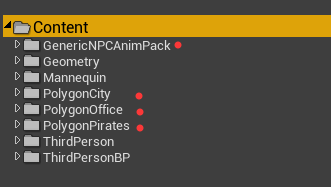
This is our project structure. The four dots indicate that these are externally imported resource packs, while the unmarked ones are the content from the default third-person template of UE4.
Of these four packs, the first pack is Unreal Marketplace (now Fab) 's NPC animation pack, which includes a UE4 character and a set of NPC animations. The other three packs are from Synty Studios 's Lowpoly resource pack. Each pack contains a 'skeleton resource' that matches the UE4 character's skeletal structure, and each skeleton resource is associated with multiple humanoid characters without animations. Meanwhile, the third-person template pack includes a character skeleton with several basic movement animations.
Objective
Our goal is to allow all the non-animated characters in packs 2, 3, and 4 to share the NPC animations from the first pack and the walking, running, and jumping animations from the third-person template pack.
At the same time, the skeleton resource structures in packs 2, 3, and 4 are the same as that of the UE4 character, so we can use animation retargeting to achieve this functionality.
Preparation Phase
All other skeletons that match the Unreal skeleton structure must ensure that their skeleton resources have completed Humanoid skeleton mapping and maintain consistent base poses (some skeletons have a default pose of T-shape, while others are A-shape),
Humanoid skeleton mapping refers to: matching each bone of our model's skeleton with the bones of a skeleton template (Humanoid Rig) provided by UE4. If our model's skeleton structure is similar or identical to UE4's Humanoid skeleton structure or naming, Unreal will automatically complete this operation for us; otherwise, we can only manually select bones one by one, which is inefficient and prone to errors.
Our (the third-person template's) Unreal character's base pose is A-shape, and it has not completed Humanoid skeleton mapping by default, while the skeleton resources in our packs 1, 2, 3, and 4 have completed Humanoid skeleton mapping. Except for pack 1, which is A (because it uses the character from pack 1), the base poses of the other packs are T-shape. Therefore, we first set the skeleton mapping for the character, and then adjust the character's base pose to T-shape (the majority rules, only 2 characters are A, the rest are T).
So first, open UE4_Mannequin_Skeleton (the character's skeleton resource, there are 2, choose the one from the third-person template), click on the Retarget Manager, and then select Select Humanoid Rig from the SelectRig dropdown list. Once completed, it should look like the image below:
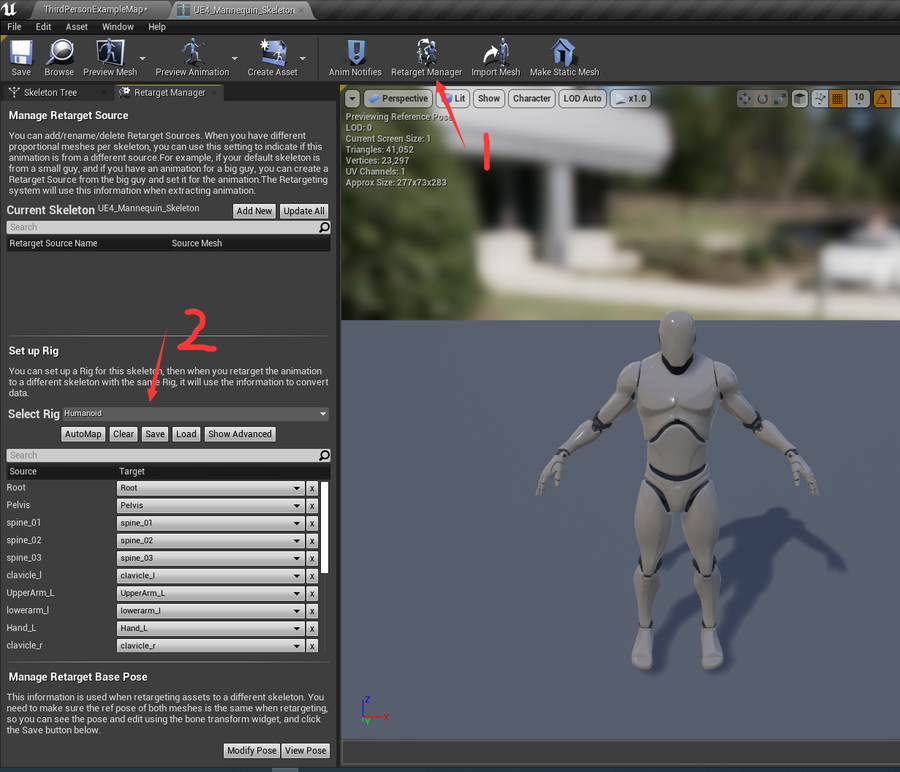
As for the skeleton mapping (the list of bones in the lower left corner), Unreal will help us complete it automatically (because the Unreal character's skeleton is sufficiently standard).
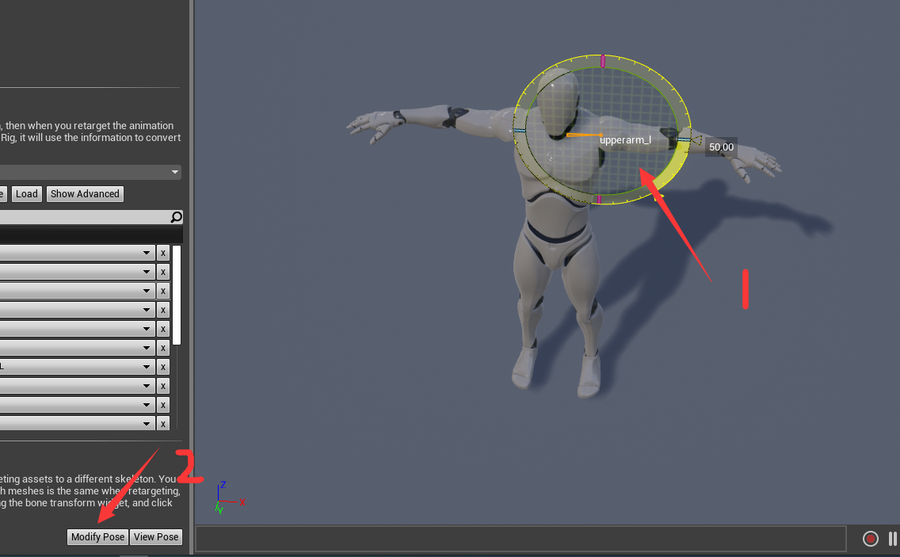
Next, we can rotate the character's shoulders and arms into a T-shape, then click ModifyPost->Use CurrentPose, and then save the resource. As shown in the image below:
Mapping the animations from the third-person template to pack 1
We will do this in several steps. First, I want to transfer the walking, running, and jumping animations from the third-person template to the NPC pack, so that all the animations we need are associated with the skeleton resource in pack 1, and the skeleton from the third-person template becomes obsolete.
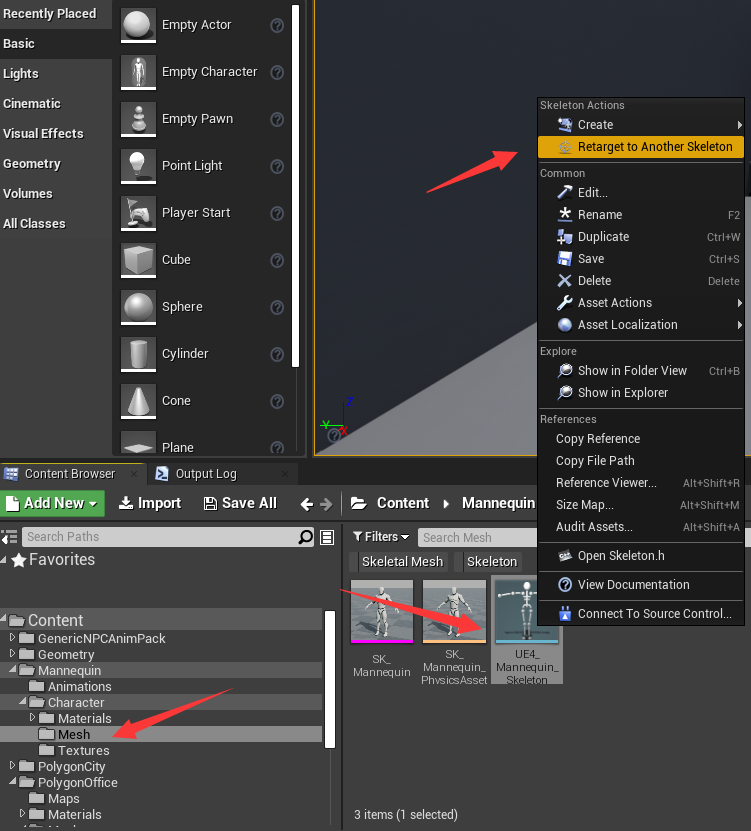
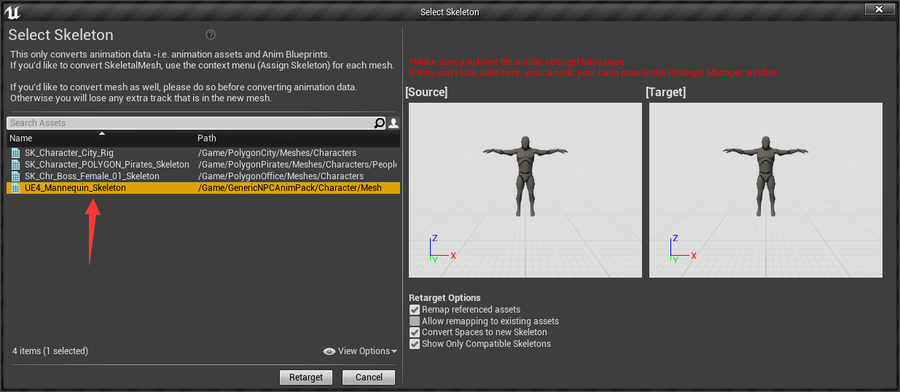
So far, all the resources associated with the skeleton of the character in the third-person template have been transferred to pack 1 (the character in GenericNPCAnimPack). At this point, the character in pack 1 has all the animations from the third-person template, as well as a bunch of NPC animations.
Linking all characters in packs 2, 3, and 4 to one skeleton
We want to share the animations from pack 1 with packs 2, 3, and 4, but each of these packs contains a skeleton resource, which means the animation retargeting process will be done three times, and the animation resources will increase threefold. However, the skeleton structures in packs 2, 3, and 4 are almost identical to the character's skeleton (some skeletons may have additional IK features), because the authors of these three packs are the same person, so we can conveniently link all characters in these three packs to one skeleton from these three packs (a total of 3 skeletons). Each SkeletonMesh can be right-clicked to assign a skeleton, for example, I want to assign a character from pack 1 (from PolygonCity) to the skeleton in pack 3 (PolygonPirates).
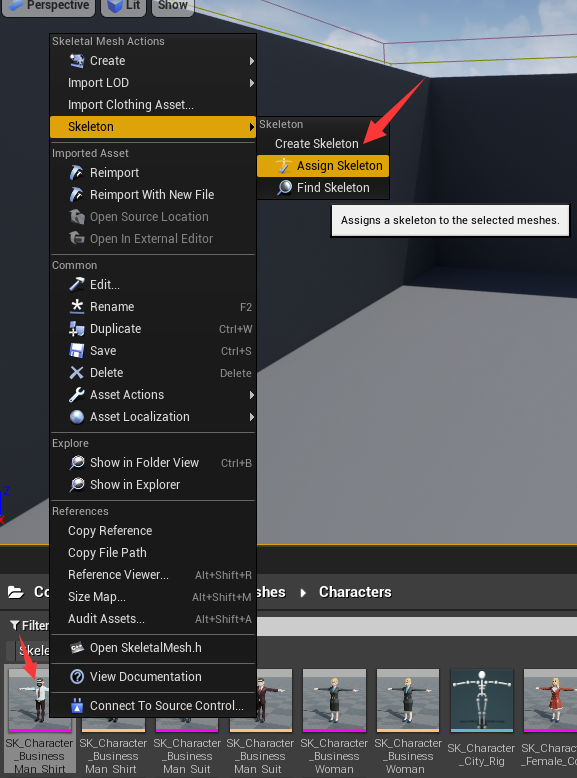
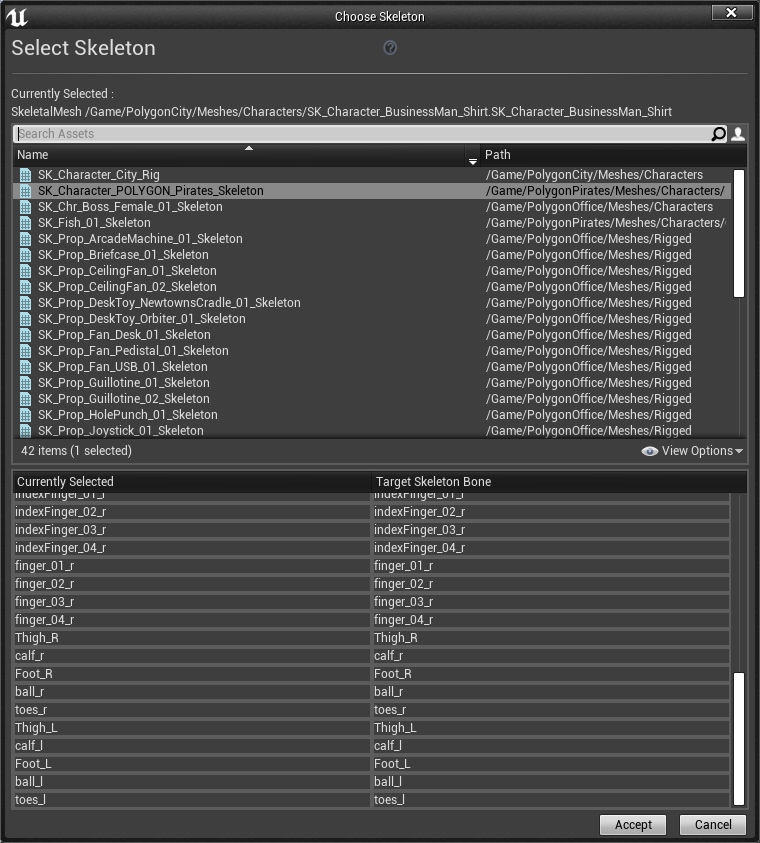
You can see that the number and names of the bones in the lower area of the image above are consistent. In this case, directly assigning should not cause major issues, but if the skeleton names, numbers, and hierarchy are incorrect, it will likely result in errors.
So we will click on all the skeleton characters in packs 2 and 3 one by one and assign them to the skeleton resource of pack 4. Clicking multiple times is better than repeating resource usage.
Transfer all animations from pack 1 to the skeleton of pack 4
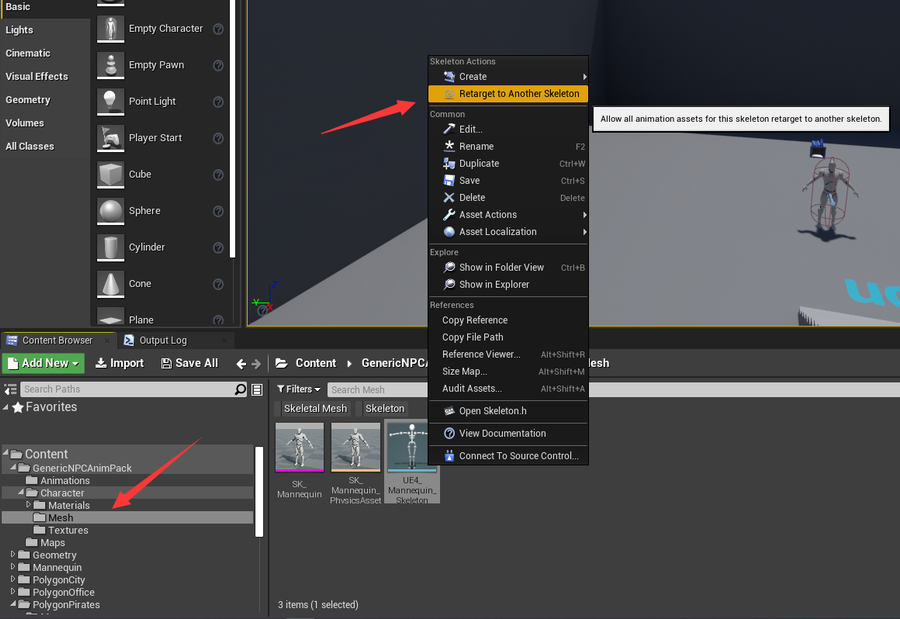
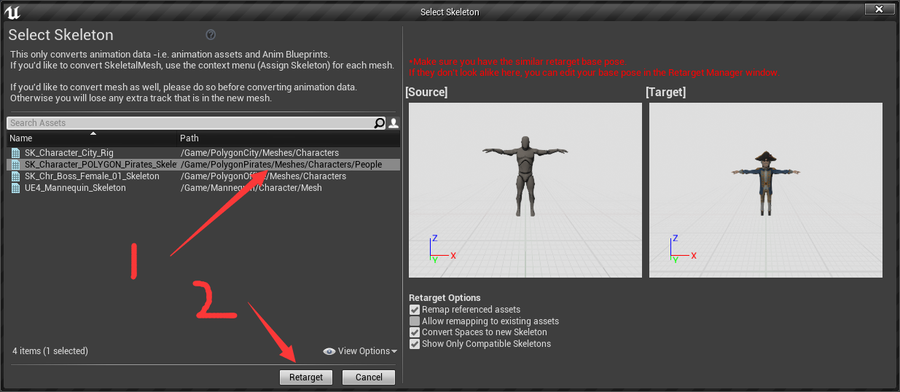
Find the character in pack 1, right-click, and then click 'Retarget to Another Skeleton', and then select the skeleton in pack 4, and then you're done!
Final Result
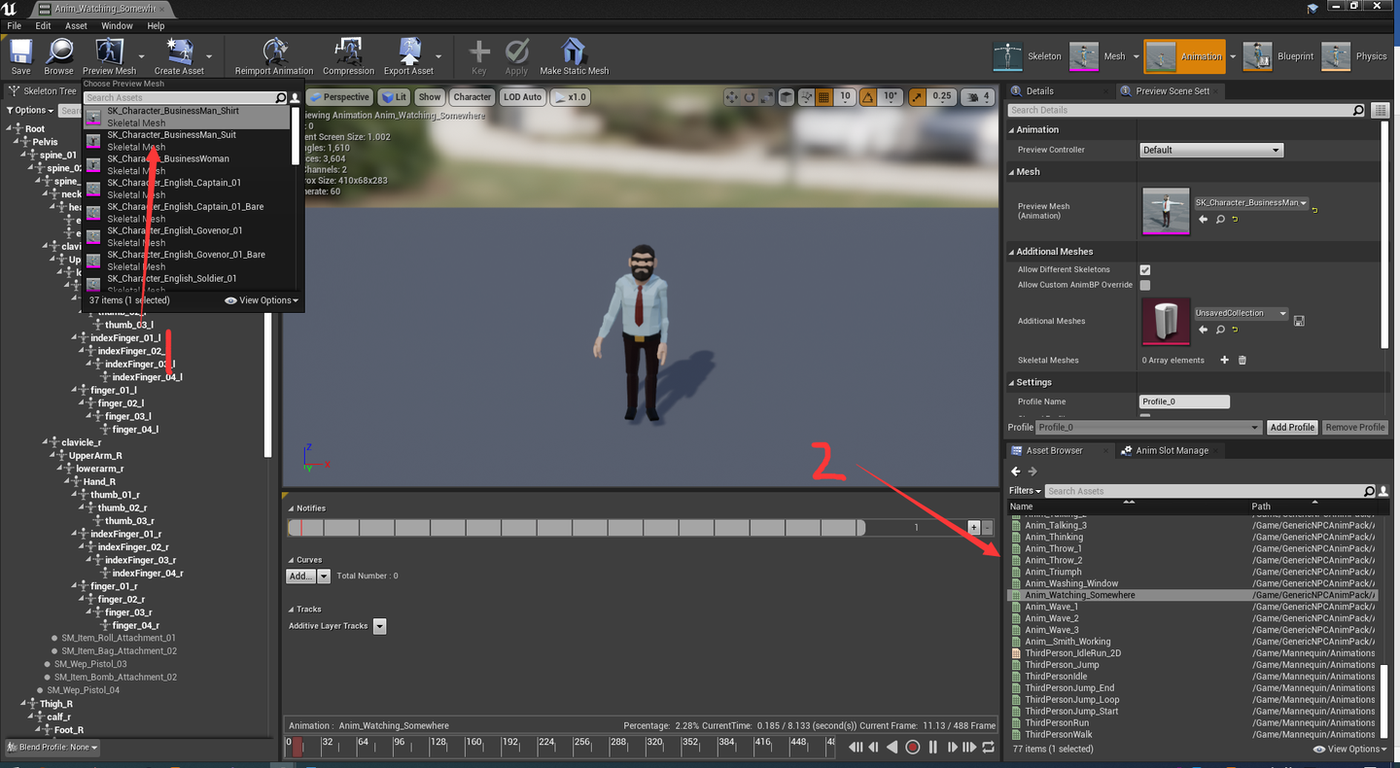
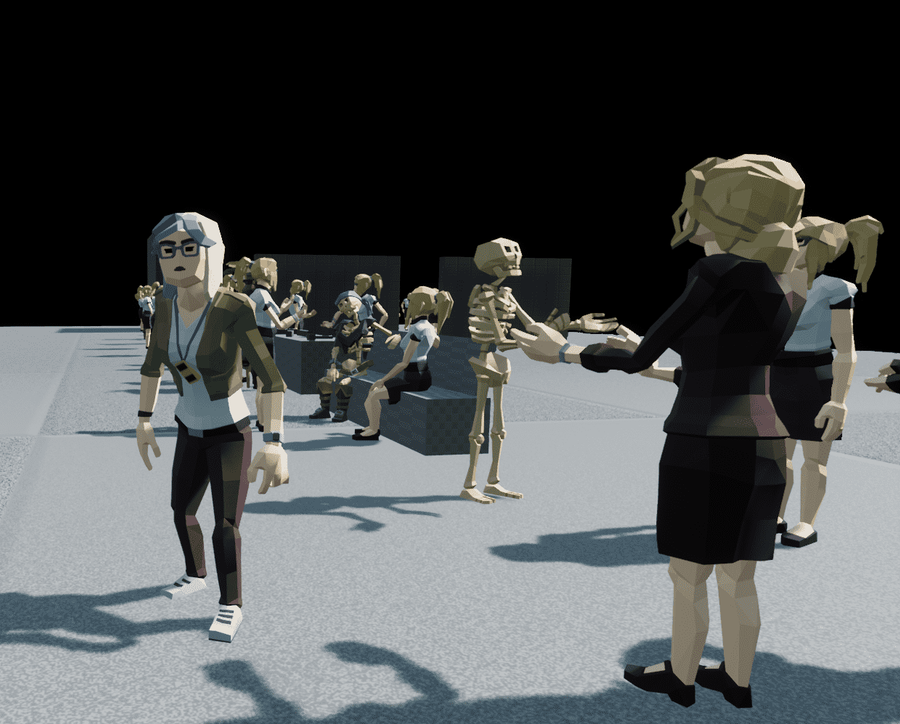
Now the skeleton in pack 4 is associated with all humanoid characters from packs 2, 3, and 4 (1), and has all animations from pack 1 (2). Now we just need to replace the character Mesh in the ThirdPersonCharacter blueprint of the third-person template with our many characters to run, and we can also edit the animation blueprint to add other animations.